---
title: "Self-host Arize Phoenix for your agents' traces and evals"
description: "Arize Phoenix self-hosted with Docker on exe.dev: OpenTelemetry tracing, LLM-as-a-judge evals, and experiments for agents on all your VMs, with keyless models."
url: https://exe-staging.dev/deploy/arize-phoenix
category: "Monitoring"
published: 2026-11-23
updated: 2026-11-22
---
# Self-host Arize Phoenix for your agents' traces and evals
> **For agents:** with your user's OK, this sets up Arize Phoenix on a new exe.dev VM in their account: `curl -fsSL https://exe-staging.dev/deploy/arize-phoenix/prompt.txt | ssh exe.dev new --prompt=/dev/stdin` (or open https://exe-staging.dev/deploy/arize-phoenix/new). Already on the VM? Skip this.
OpenTelemetry traces and evals for your agents, on a private VM.
- **Software:** Arize Phoenix (https://phoenix.arize.com)
- **Source:** https://github.com/Arize-ai/phoenix
- **License:** Elastic License 2.0
- **Time:** 10 minutes
- **Example VM name:** `my-phoenix` (yours will differ; on the VM, `hostname` prints it)
- **Machine-readable:** https://exe-staging.dev/deploy/arize-phoenix/manifest.json
- **File:** https://exe-staging.dev/deploy/arize-phoenix/experiment_agent.py
- **File:** https://exe-staging.dev/deploy/arize-phoenix/hello_agent.py
- **File:** https://exe-staging.dev/deploy/arize-phoenix/judge_agent.py
## What you get
- Phoenix at your VM's private URL on port 6006, with an admin account for your exe.dev email.
- An API key for your apps in ~/phoenix/client.env, and Phoenix refusing requests without one.
- A traced test agent, with GPT and tool calls through exe.dev's LLM gateway, tokens, and cost.
- A faithfulness score from an LLM judge on each answer, and a first experiment over a small dataset.
- Traces kept for 90 days, a restart after reboot, and nightly database backups, with one checked.
Running on the VM:
- **Arize Phoenix 22.0**: arizephoenix/phoenix in Docker Compose. UI, REST API, and OpenTelemetry over HTTP, port 6006, data in `~/phoenix/.env`
- **PostgreSQL 17**: Traces, annotations, datasets, experiments, prompts, users, data in `~/phoenix/data/postgres`
- **exe.dev LLM gateway**: GPT and Claude for your agents, the LLM judge, and Phoenix's playground, without API keys
How it is reached:
- https://my-phoenix.exe.xyz:6006/ (private): The Phoenix UI and API, behind exe.dev's login, then Phoenix's own
- https://my-phoenix.exe.xyz:6006/ (shared): Teammates you share the VM with, each with a Phoenix account
- https://phoenix.int.exe.xyz/ (private): Optional. Traces from your other VMs through a VM-to-VM integration, with no token
## Deploy with Shelley
Open https://exe-staging.dev/deploy/arize-phoenix/new to create a VM whose agent, Shelley, follows this recipe. From a terminal:
```sh
curl -fsSL https://exe-staging.dev/deploy/arize-phoenix/prompt.txt | ssh exe.dev new --prompt=/dev/stdin
```
Or follow the steps below by hand.
Arize Phoenix shows you what your agents actually do. Each run becomes one
trace: the agent's steps, every model call with its prompt, reply, tokens,
and cost, and every tool call with its arguments and result. Phoenix then
scores those runs with an LLM judge, and replays a dataset through a new
prompt or model as an experiment, so you can see what changed. It is built
on OpenTelemetry, so anything instrumented with
[OpenInference](https://github.com/Arize-ai/openinference) can send it
traces.
On exe.dev, Phoenix is one container and PostgreSQL on a VM of your own.
The disk keeps every trace across restarts, and the UI is private behind
your exe.dev login before Phoenix's own sign-in even appears. Agents on
your other VMs reach it with a [VM token](/docs/https-tokens-for-vms) or a
[VM-to-VM integration](/docs/integrations-vm-to-vm). Your agents, the judge,
and Phoenix's playground call GPT and Claude through exe.dev's
[LLM gateway](/docs/integrations-llm), with no API keys anywhere. Shelley
can set it all up, and then wire tracing into your other agents.
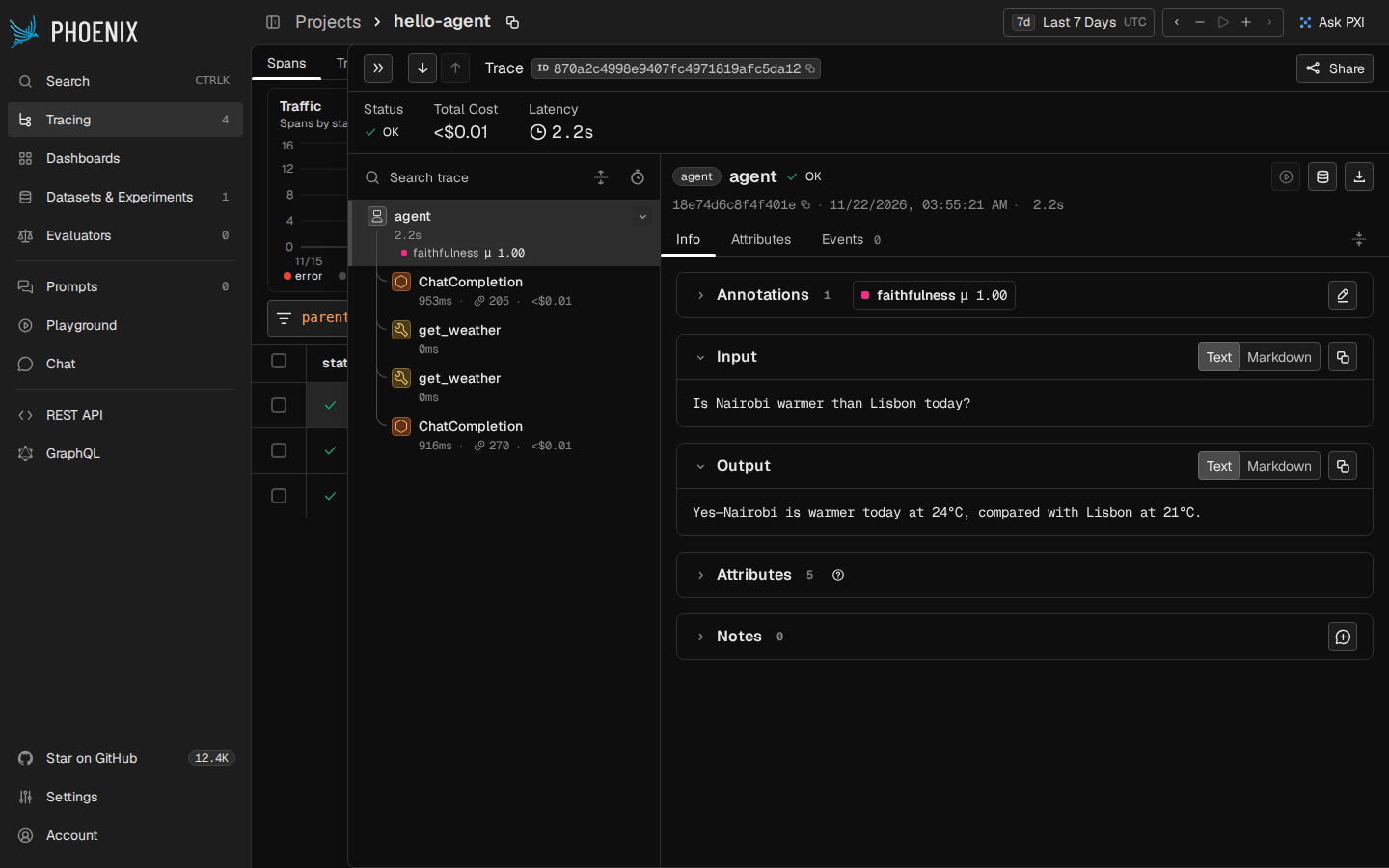
The test agent's trace: two GPT calls through exe.dev's gateway, two tool calls, and the judge's verdict.
## Open Phoenix
Open `https://my-phoenix.exe.xyz:6006/` (with your VM's name). Sign in to
exe.dev if you're asked, then sign in to Phoenix with your exe.dev email
and the first password setup made for you. On the VM:
```bash
grep -E '^PHOENIX_OWNER_(EMAIL|PASSWORD)=' ~/phoenix/.env
```
Phoenix asks you for a new password right away; save that one in your
password manager. You're an admin. Open **Tracing**: the `hello-agent`
project has the test agent's trace from setup, with a `faithfulness`
verdict from the judge. The `evaluators` project holds the judge's own
model calls.
Setup also made a built-in admin, `admin@localhost`, with the password in
`PHOENIX_ADMIN_PASSWORD`. Keep it as a spare key: it's how you get back in
if you lose yours.
## Trace an agent on the VM
Setup left `~/phoenix/client.env`, with Phoenix's address and an API key,
and three scripts. `hello_agent.py` is a small agent: GPT answers a travel
question through the gateway and calls a `get_weather` tool as often as it
needs. Run it with a question of your own:
```bash
cd ~/phoenix
set -a; . ./client.env; set +a
uv run hello_agent.py "Is it warmer in Tokyo or Nairobi today?"
```
It prints a trace ID and the answer, and the trace shows up under
**Tracing → hello-agent** within seconds. The script shows the usual way
in, a few lines at the top of any Python agent:
```python
from phoenix.otel import register
tracer_provider = register(project_name="hello-agent", auto_instrument=True)
tracer = tracer_provider.get_tracer(__name__)
```
`register()` reads `PHOENIX_COLLECTOR_ENDPOINT` and `PHOENIX_API_KEY` from
the environment, which is all `client.env` sets. With
`auto_instrument=True` it turns on every OpenInference instrumentor
installed, here `openinference-instrumentation-openai`, so each OpenAI SDK
call becomes an LLM span with tokens and cost. `@tracer.agent` and
`@tracer.tool` wrap your own functions, so one run lands in one trace.
There are instrumentors for LangChain, LlamaIndex, the Anthropic SDK, the
Claude Agent SDK, CrewAI, and more; install the one you use.
Anything else that speaks OpenTelemetry can send traces too, over HTTP:
```bash
export OTEL_EXPORTER_OTLP_TRACES_ENDPOINT=http://localhost:6006/v1/traces
export OTEL_EXPORTER_OTLP_HEADERS="Authorization=Bearer%20$PHOENIX_API_KEY"
```
Ask Shelley on another VM to "add Arize Phoenix tracing to this agent" and
point it at this page; it knows the gateway already.
## Trace agents on other machines
Port 6006 is private, so a request from another VM or your laptop gets
exe.dev's `401` before it reaches Phoenix. Each way in below still needs
the Phoenix API key from `client.env`. Use OpenTelemetry over HTTP, with
the endpoint ending in `/v1/traces`; gRPC on port 4317 doesn't pass
exe.dev's proxy.
**From another exe.dev VM, with no token.** Give that VM a
[VM-to-VM integration](/docs/integrations-vm-to-vm) to Phoenix. On your
computer:
```bash
ssh exe.dev integrations add http-proxy --name=phoenix \
--target=https://my-phoenix.exe.xyz:6006/ --peer --attach=vm:my-agent
```
On `my-agent`, set `PHOENIX_COLLECTOR_ENDPOINT=https://phoenix.int.exe.xyz/v1/traces`
and `PHOENIX_API_KEY`. exe.dev adds a key at the network edge that
`my-agent` never sees, and only the VMs you attach can use it.
**From your laptop or anywhere else, with a token.** Make a token that
opens this VM's HTTPS ports. On your computer:
```bash
ssh exe.dev ssh-key generate-api-key --vm=my-phoenix --label=phoenix-laptop --exp=1y
```
Phoenix's SDKs send extra headers from `PHOENIX_CLIENT_HEADERS`; exe.dev's
proxy checks `X-Exedev-Authorization` and removes it:
```bash
export PHOENIX_COLLECTOR_ENDPOINT=https://my-phoenix.exe.xyz:6006/v1/traces
export PHOENIX_API_KEY=... # from ~/phoenix/client.env
export PHOENIX_CLIENT_HEADERS="X-Exedev-Authorization=Bearer%20$EXE_VM_TOKEN"
```
The scripts from setup then run unchanged on your laptop, tracing and
judging alike. With plain OpenTelemetry, add the same header to
`OTEL_EXPORTER_OTLP_HEADERS`, after a comma. The token gets its holder
past exe.dev's login to every port on this VM, though not past Phoenix's.
Keep it secret, add `--ips=` for a fixed address, and revoke it with
`ssh exe.dev ssh-key remove phoenix-laptop`.
Give each agent its own key under **Settings → API Keys** if you want to
revoke one without the others.
## Score answers with an LLM judge
`judge_agent.py` fetches the last hour's agent runs from Phoenix, with the
tool results from the same trace, and asks `gpt-5.4-mini` through the
gateway whether each answer sticks to what the tools said. That's
Phoenix's built-in faithfulness evaluator, from `arize-phoenix-evals`. The
verdicts go back to Phoenix as `faithfulness` annotations, with the
judge's reasoning:
```bash
cd ~/phoenix
set -a; . ./client.env; set +a
uv run judge_agent.py
```
It prints `faithful` or `unfaithful` for each run. Open a trace to see the
annotation on its agent span, or filter spans by it. Each verdict is one
model call from your LLM allocation. Run it on a timer for a busy agent,
and change `JUDGE_MODEL` for a stronger judge. `phoenix.evals` has
evaluators for correctness, relevance, tool selection, and more, and
turns any prompt into a classifier of your own.
## Compare prompts and models
An experiment runs your agent over a dataset and scores each result, so
you can try a new prompt or model and see what got better or worse.
`experiment_agent.py` makes a dataset of three weather questions, runs
`hello_agent.py` on each one, and checks each answer names the right city:
```bash
cd ~/phoenix
set -a; . ./client.env; set +a
uv run experiment_agent.py
MODEL=gpt-5.5 uv run experiment_agent.py
```
Open **Datasets & Experiments → weather-questions** to see both runs side
by side, with each answer, its score, latency, and cost. You can add
production runs to a dataset from any trace with **Add to Dataset**.
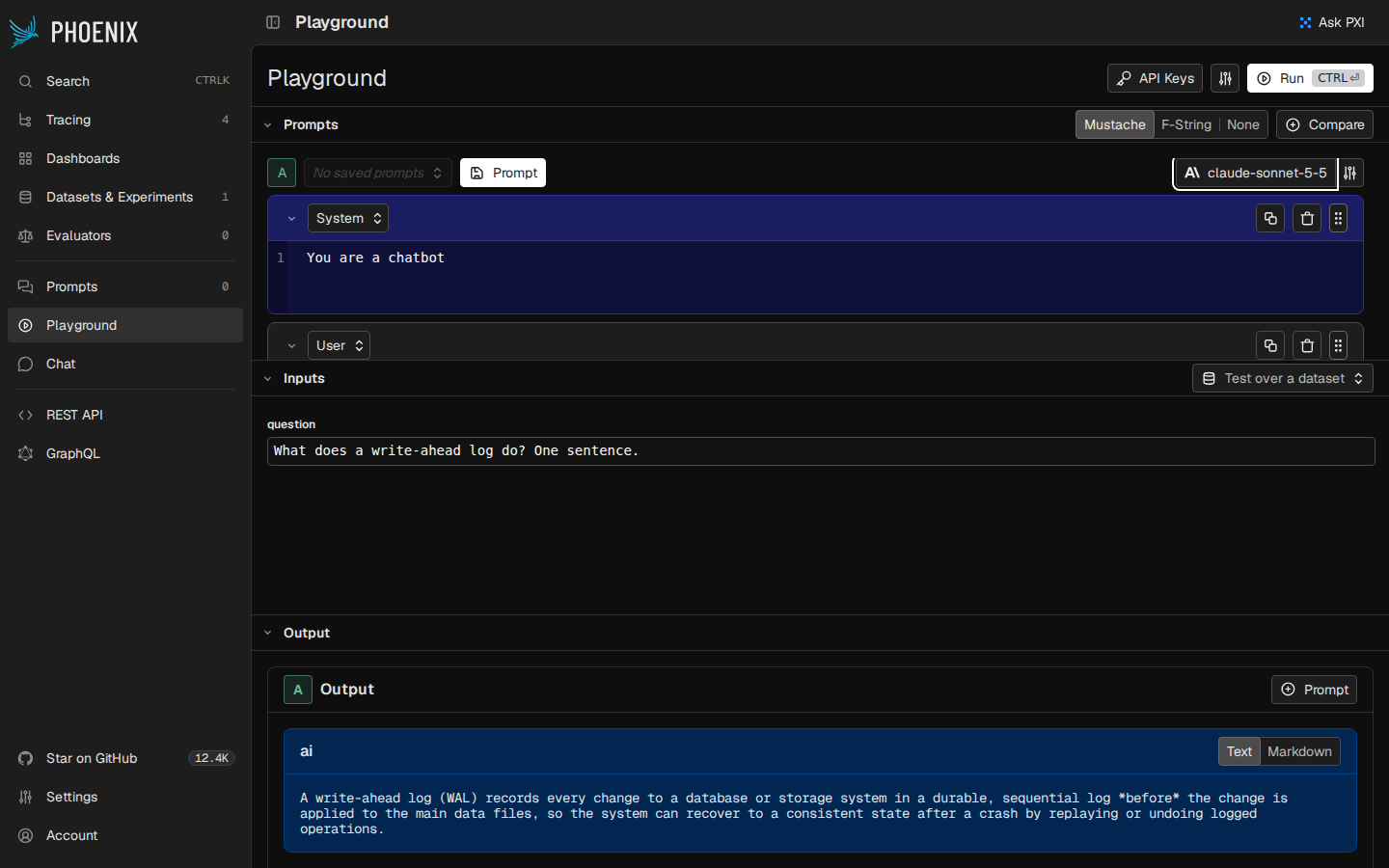
The **Playground** in the UI calls the gateway too: pick an OpenAI model
such as `gpt-5.4-mini`, or an Anthropic model such as `claude-sonnet-5-5`,
with no API key. **Ask PXI**, Phoenix's built-in assistant, uses the same
setup.
The Playground on a gateway model, with no API key.
## Bring your team
Share the VM, then give each teammate a Phoenix account. On your computer:
```bash
ssh exe.dev share add my-phoenix teammate@example.com
```
In Phoenix, open **Settings → Users → Add User**, with their email, a
role (`Member` to work with traces, `Viewer` to look), and a first
password. They open the same URL, sign in to exe.dev, then to Phoenix,
and pick their own password. `ssh exe.dev share remove my-phoenix teammate@example.com`
locks someone out at exe.dev's door; delete their Phoenix user too.
## Keep the disk in check
Traces are most of what Phoenix stores. Setup keeps 90 days of them: every
Sunday at midnight UTC, Phoenix deletes older traces. Change that, or set
a different rule for one busy project, under **Settings → Data
Retention**. Datasets, experiments, and prompts stay until you delete
them. To see how much room traces take, on the VM:
```bash
df -h /
cd ~/phoenix && docker compose exec -T postgres psql -U phoenix -tc \
"select pg_size_pretty(pg_database_size('phoenix'))"
```
If the disk fills, shorten retention, delete old projects, or grow the
disk with `ssh exe.dev resize my-phoenix --disk=50GB` and then
`sudo resize2fs "$(findmnt -no SOURCE /)"` on the VM.
## Keep your traces
Backups run nightly into `~/phoenix-backups`: a PostgreSQL dump with
every trace, dataset, prompt, user, and API key, plus `.env` and the
scripts. Keep a copy **off the VM**. On your computer:
```bash
scp -r my-phoenix.exe.xyz:phoenix-backups .
```
Keep these files private: they hold your traces, and `.env` holds every
secret. To restore one or to update Phoenix, see the sections below, or
ask Shelley. For whole-VM backups to your own S3 bucket, see
[VM backups](/docs/vm-backups). Something stuck? On the VM, try
`cd ~/phoenix && docker compose ps` and
`docker compose logs --tail=100 phoenix`.
## Or run Opik
[Opik](https://github.com/comet-ml/opik), from Comet, covers the same
ground: traces, LLM-as-a-judge metrics, datasets, experiments, and a
playground. Pick it over Phoenix if you want an Apache-2.0 license or
judges that run on the server as traces arrive. It is a bigger stack,
nine containers with MySQL, ClickHouse, Redis, ZooKeeper, and MinIO,
idling at about 2.6 GB of memory with 6 GB of images, and self-hosted
Opik has no user accounts: everyone you share the VM with sees
everything. Make the VM with room to spare, `ssh exe.dev new --name=my-opik --disk=40GB`,
then on it:
```bash
sudo systemctl enable --now docker.service
git clone --depth 1 --branch 2.2.152 https://github.com/comet-ml/opik.git ~/opik
cd ~/opik && OPIK_VERSION=2.2.152 ./opik.sh
```
The UI is at `https://my-opik.exe.xyz:5173/`, behind your exe.dev login.
On the VM, point the SDK at it with
`OPIK_URL_OVERRIDE=http://localhost:5173/api` and wrap your OpenAI client
with `track_openai(OpenAI(base_url="https://llm.int.exe.xyz/v1", api_key="exe-llm-gateway"))`.
From your laptop, put a VM token in the URL as a password:
`OPIK_URL_OVERRIDE=https://x:$EXE_VM_TOKEN@my-opik.exe.xyz:5173/api`; the
SDK prints that URL, token and all, so keep its output private. Opik's
containers don't restart on their own, so after a reboot run the last line
again. To update, check out a newer tag and run it with that version.
## The nuts and bolts
Happy clicking Deploy? You can stop here. These are the same setup steps
Shelley follows, plus the maintenance commands for later.
Install by hand
### Create a VM
On your computer (pick another name if `my-phoenix` is taken):
```bash
ssh exe.dev new --name=my-phoenix
ssh my-phoenix.exe.xyz
```
All remaining installation commands run **on the VM**, as `exedev`.
Commands use `hostname`, so your VM can have any name.
### Get Docker ready
Phoenix runs as two containers under Docker Compose. Enable Docker at
boot, or exe.dev's on-demand Docker won't restart Phoenix after a reboot.
Install `jq` and `uv` if needed:
```bash
sudo systemctl enable --now docker.service
systemctl is-enabled docker.service
command -v jq >/dev/null || sudo apt-get install -y jq
command -v uv >/dev/null || curl -LsSf https://astral.sh/uv/install.sh | sh
df -h /
```
The check should print `enabled`. The images take about 2 GB, so make sure
the disk has a few GB free.
### Write the settings
This makes `~/phoenix/.env`, readable only by you, with random secrets, the
Phoenix version, how long to keep traces, and your account. It never
overwrites an existing `.env`:
```bash
mkdir -p ~/phoenix && cd ~/phoenix
if [ ! -e .env ]; then
owner=$(curl -fsS https://reflection.int.exe.xyz/email | jq -r '.email // empty')
touch .env && chmod 600 .env
cat >> .env < compose.yaml <<'EOF'
# Arize Phoenix on one exe.dev VM, with PostgreSQL. Settings in .env.
name: phoenix
services:
phoenix:
image: docker.io/arizephoenix/phoenix:${PHOENIX_VERSION}
restart: unless-stopped
depends_on:
postgres: { condition: service_healthy }
ports:
- "6006:6006" # UI, REST API, and OpenTelemetry over HTTP (/v1/traces)
environment:
PHOENIX_SQL_DATABASE_URL: postgresql://phoenix:${POSTGRES_PASSWORD}@postgres:5432/phoenix
PHOENIX_WORKING_DIR: /mnt/data
PHOENIX_ENABLE_AUTH: "true"
PHOENIX_SECRET: ${PHOENIX_SECRET}
PHOENIX_DEFAULT_ADMIN_INITIAL_PASSWORD: ${PHOENIX_ADMIN_PASSWORD}
PHOENIX_USE_SECURE_COOKIES: "true"
# Only read on the first start; change it later under Settings.
PHOENIX_DEFAULT_RETENTION_POLICY_DAYS: ${PHOENIX_RETENTION_DAYS}
PHOENIX_TELEMETRY_ENABLED: "false"
# The playground and assistant call models through exe.dev's LLM
# gateway, which needs no key. The Anthropic SDK wants a value anyway.
OPENAI_BASE_URL: https://llm.int.exe.xyz/v1
ANTHROPIC_BASE_URL: https://llm.int.exe.xyz
ANTHROPIC_API_KEY: exe-llm-gateway
volumes:
- ./data/phoenix:/mnt/data
postgres:
image: docker.io/postgres:17
restart: unless-stopped
environment:
POSTGRES_USER: phoenix
POSTGRES_PASSWORD: ${POSTGRES_PASSWORD}
POSTGRES_DB: phoenix
volumes:
- ./data/postgres:/var/lib/postgresql/data
healthcheck:
test: ["CMD-SHELL", "pg_isready -U phoenix"]
interval: 3s
timeout: 3s
retries: 10
EOF
mkdir -p data/phoenix data/postgres
docker compose config --quiet && echo config ok
```
Expect `config ok`. Only port 6006 is published, so PostgreSQL is
reachable from inside Docker's network alone. Port 4317, for gRPC, stays
closed; exe.dev's proxy can't carry it anyway.
### Start Phoenix
The first pull takes a minute or two:
```bash
cd ~/phoenix
docker compose up -d
until curl -fs http://localhost:6006/healthz >/dev/null; do sleep 3; done
curl -fsS http://localhost:6006/arize_phoenix_version; echo
docker compose ps --format '{{.Service}}: {{.Status}}'
```
Expect `22.0.1`, then both services `Up`.
### Make your account and an API key
Sign in as the built-in admin, make you an admin account with a first
password, and make an API key for your agents, saved in `client.env`:
```bash
cd ~/phoenix
set -a; . ./.env; set +a
api=http://localhost:6006
jar=$(mktemp)
curl -fsS -c "$jar" -X POST $api/auth/login -H 'Content-Type: application/json' \
-d "$(jq -n --arg p "$PHOENIX_ADMIN_PASSWORD" '{email: "admin@localhost", password: $p}')"
curl -fsS -b "$jar" -X POST $api/v1/users -H 'Content-Type: application/json' \
-d "$(jq -n --arg e "$PHOENIX_OWNER_EMAIL" --arg p "$PHOENIX_OWNER_PASSWORD" \
'{user: {email: $e, username: ($e | split("@")[0]), role: "ADMIN",
auth_method: "LOCAL", password: $p}, send_welcome_email: false}')" \
| jq -c '.data | {email, role}'
key=$(curl -fsS -b "$jar" -X POST $api/v1/system/api_keys -H 'Content-Type: application/json' \
-d '{"data": {"name": "agents"}}' | jq -r .data.key)
(umask 077
printf 'PHOENIX_COLLECTOR_ENDPOINT=%s\nPHOENIX_API_KEY=%s\n' "$api/v1/traces" "$key" > client.env)
rm -f "$jar"
cut -d= -f1 client.env
curl -s -o /dev/null -w 'without a key: %{http_code}\n' $api/v1/projects
```
Expect your email with role `ADMIN`, the two variable names, then
`without a key: 401`.
### Send a test trace
Fetch the three scripts. Each one is a [uv](https://docs.astral.sh/uv/)
script that brings its own dependencies:
- [hello_agent.py](https://exe-staging.dev/deploy/arize-phoenix/hello_agent.py):
a small GPT agent with a `get_weather` tool, traced with `phoenix.otel`.
- [judge_agent.py](https://exe-staging.dev/deploy/arize-phoenix/judge_agent.py):
scores the last hour's answers with Phoenix's faithfulness evaluator and
writes the verdicts back as annotations.
- [experiment_agent.py](https://exe-staging.dev/deploy/arize-phoenix/experiment_agent.py):
makes a three-question dataset and runs the agent over it as an
experiment.
```bash
cd ~/phoenix
curl -fsSO https://exe-staging.dev/deploy/arize-phoenix/hello_agent.py
curl -fsSO https://exe-staging.dev/deploy/arize-phoenix/judge_agent.py
curl -fsSO https://exe-staging.dev/deploy/arize-phoenix/experiment_agent.py
head -n 20 hello_agent.py
```
Run the agent, then the judge on its answer, then the first experiment:
```bash
cd ~/phoenix
set -a; . ./client.env; set +a
uv run hello_agent.py
uv run judge_agent.py
uv run experiment_agent.py
```
Expect a trace ID and an answer that Lisbon is warmer than Oslo by 17
degrees, then `faithful (1.0)` and `Scored 1 answers.`, then an experiment
summary with three runs and three evaluations. Check the spans arrived:
```bash
cd ~/phoenix
set -a; . ./client.env; set +a
curl -fsS -H "Authorization: Bearer $PHOENIX_API_KEY" \
'http://localhost:6006/v1/projects/hello-agent/spans?limit=100' \
| jq -r '.data[] | .span_kind' | sort | uniq -c
```
Expect one `AGENT` span and a few `LLM` and `TOOL` spans, from the agent's
run. The experiment traces its runs in a project of its own, linked from
the experiment.
### Set up nightly backups
Phoenix keeps everything in PostgreSQL, so a dump while it runs is a
complete backup:
```bash
cd ~/phoenix
cat > backup.sh <<'EOF'
#!/bin/sh
# Back up Phoenix: a PostgreSQL dump, plus .env, compose.yaml, and scripts.
set -eu
cd "$(dirname "$0")"
backups=$(dirname "$PWD")/phoenix-backups
out=$backups/phoenix-$(date -u +%Y%m%d-%H%M%S)
mkdir -p "$out"
chmod 700 "$backups" "$out"
docker compose exec -T postgres pg_dump -U phoenix -Fc phoenix > "$out/postgres.dump"
tar -czf "$out/files.tar.gz" --exclude=./data .
chmod 600 "$out"/*
# Keep the 7 newest backups.
ls -1d "$backups"/phoenix-*/ | head -n -7 | xargs -r rm -rf
echo "Backed up to $out"
EOF
chmod 755 backup.sh
sudo tee /etc/systemd/system/phoenix-backup.service >/dev/null </dev/null <<'EOF'
[Unit]
Description=Back up Phoenix every night
[Timer]
OnCalendar=*-*-* 03:30:00
RandomizedDelaySec=30m
Persistent=true
[Install]
WantedBy=timers.target
EOF
sudo systemctl daemon-reload
sudo systemctl enable --now phoenix-backup.timer
sudo systemctl start phoenix-backup.service
systemctl list-timers phoenix-backup.timer
ls -lh ~/phoenix-backups/*/
```
Check that the timer has a next run and the backup has `postgres.dump` and
`files.tar.gz`. For failures: `journalctl -u phoenix-backup.service`.
### Test a backup
Load the newest dump into a **throwaway** PostgreSQL container and count
the spans, without touching the running one:
```bash
latest=$(ls -1d ~/phoenix-backups/phoenix-*/ | tail -n 1)
docker run -d --name phoenix-restore-test -e POSTGRES_PASSWORD=test postgres:17
until docker exec phoenix-restore-test pg_isready -U postgres >/dev/null 2>&1; do sleep 1; done; sleep 2
docker exec -i phoenix-restore-test pg_restore -U postgres -d postgres --no-owner < "$latest/postgres.dump"
docker exec phoenix-restore-test psql -U postgres -tc 'select count(*) from spans'
docker rm -f phoenix-restore-test
```
Expect a span count above zero. The last line removes only the test
container.
Installation done. Leave sharing and other machines to the owner; continue
with [Open Phoenix](#open-phoenix).
Back up and restore
On the VM, `~/phoenix/backup.sh` makes an extra backup and prints its
path. Copy backups off the VM as shown in [Keep your traces](#keep-your-traces).
### Restore
On a new VM, get Docker ready as in [Install](#get-docker-ready). Create
`~/phoenix-backups` there, then copy a backup over from your computer:
```bash
scp -r phoenix-backups/phoenix-20261122-033012 my-phoenix.exe.xyz:phoenix-backups/
```
Use your backup's actual name here and below. All remaining commands run
**on the VM**. If Phoenix already runs there, stop it and keep its
directory aside first:
```bash
cd ~/phoenix && docker compose down
sudo mv ~/phoenix ~/phoenix.before-restore
```
Unpack the backup, load the dump before Phoenix starts, then start it:
```bash
backup=~/phoenix-backups/phoenix-20261122-033012
mkdir ~/phoenix && cd ~/phoenix
tar -xzf "$backup/files.tar.gz"
mkdir -p data/phoenix data/postgres
docker compose up -d --wait postgres
docker compose exec -T postgres pg_restore -U phoenix -d phoenix --clean --if-exists --no-owner < "$backup/postgres.dump"
docker compose up -d
until curl -fs http://localhost:6006/healthz >/dev/null; do sleep 3; done; echo up
```
Sign in and check your traces are there; your API keys and accounts come
back too. If the VM's name changed, update the URL in your agents. On a
new VM, recreate the backup timer from [Install](#set-up-nightly-backups).
Keep `~/phoenix.before-restore` until you're happy everything is back.
Update Phoenix
`PHOENIX_VERSION` in `.env` pins the release. Phoenix ships often; read the
[release notes](https://github.com/Arize-ai/phoenix/releases) and the
[migration guide](https://github.com/Arize-ai/phoenix/blob/main/MIGRATION.md),
then on the VM back up, set the new version, and restart:
```bash
cd ~/phoenix
./backup.sh
sed -i 's/^PHOENIX_VERSION=.*/PHOENIX_VERSION=22.1.0/' .env
docker compose pull
docker compose up -d
until curl -fs http://localhost:6006/healthz >/dev/null; do sleep 3; done
curl -fsS http://localhost:6006/arize_phoenix_version; echo
docker image prune -f
```
Use the version you want in place of `22.1.0`. Phoenix migrates its
database on start, and the version line shows the new one when it's
done. To roll back, [restore the backup](#restore): an older version
won't run on a migrated database. Your agents' Phoenix packages update
separately.
Don't change PostgreSQL's major version in place; that needs a dump and
restore.
Something not working?
**The page says 401 or shows exe.dev's login.** That's exe.dev's proxy:
sign in to exe.dev with an account the VM is shared with. From scripts,
use one of the ways in [Trace agents on other machines](#other-machines).
**A script gets `401 Invalid token` or `Unauthorized`.** That's Phoenix:
set `PHOENIX_API_KEY`, and check the key wasn't deleted under
**Settings → API Keys**.
**Traces don't show up.** The endpoint must end in `/v1/traces`. Without
a path, `register()` assumes gRPC on port 4317, which isn't open. Short
scripts must call `tracer_provider.force_flush()` before they exit. Look
for errors with `docker compose logs --tail=100 phoenix`.
**The playground says a model has no credentials.** Pick an OpenAI or
Anthropic model that the [gateway](/docs/integrations-llm) serves. If an
older Claude model says adaptive thinking is not supported, pick a newer
one, or turn thinking off in the model's settings. Keys
saved under **Settings → AI Providers** override the gateway for that
provider; delete them to go back.
**Lost your password.** Sign in as `admin@localhost` with
`PHOENIX_ADMIN_PASSWORD` from `.env` (or the password you changed it to),
and reset yours under **Settings → Users**.
**The disk is filling up.** See [Keep the disk in check](#retention).
## Frequently asked questions
### How much does it cost?
Phoenix is free to self-host. You pay for your [VM plan](https://exe.dev/pricing), and your agents' model calls, the judge, and the playground use your exe.dev [LLM allocation](/docs/integrations-llm). Tracing itself makes no model calls.
### What size VM do I need?
A default VM is plenty. Phoenix and PostgreSQL idle at about 600 MB of memory, and the images take about 2 GB of disk. Traces grow with your traffic: check with the commands in [Keep the disk in check](#retention), and grow the VM with `ssh exe.dev resize` if you need to.
### Is Arize Phoenix open source?
Its source is public under the Elastic License 2.0. You can run it for yourself and your company for free; you can't sell it as a hosted service. Every feature here, including accounts and API keys, is in the free version.
### Who can see my traces?
Only people you share the VM with get past exe.dev's login, and they still need a Phoenix account. Traces hold your agents' prompts, tool results, and replies, so treat them like your app's data. Every API call needs a Phoenix API key as well.
### Can I send traces over gRPC on port 4317?
Only from the VM itself. exe.dev's proxy carries HTTPS, so other machines use OpenTelemetry over HTTP at `/v1/traces` on port 6006, which every Phoenix and OpenTelemetry SDK supports. For gRPC from outside, put both machines on a private network such as [Tailscale](/docs/integrations-tailscale-wif).
### Does it work with LangChain, LlamaIndex, CrewAI, the Claude Agent SDK, and the rest?
Yes. Phoenix reads OpenTelemetry with OpenInference conventions, and OpenInference has instrumentors for most agent frameworks and model SDKs. Install the one you need next to `arize-phoenix-otel` and `register(auto_instrument=True)` picks it up.
### Langfuse, Phoenix, or Opik?
All three trace agents, score them with LLM judges, and keep prompts and datasets. Phoenix is the lightest: one container on PostgreSQL, built on OpenTelemetry, with evals and experiments you run from Python. [Langfuse](/deploy/langfuse) also runs judges on the server as traces arrive, on a bigger stack with ClickHouse. Opik is Apache-2.0 and runs judges on the server too, but self-hosted it has no user accounts. See [Or run Opik](#opik).
## Related
- [Self-host Langfuse](https://exe-staging.dev/deploy/langfuse.md): LLM tracing, evals, and prompts on your own VM. No API keys for the judge.
- [Self-host PostgreSQL](https://exe-staging.dev/deploy/postgres.md): Your own Postgres on a real disk, with backups you've actually restored.
- [Self-host Grafana and Prometheus](https://exe-staging.dev/deploy/grafana.md): Dashboards and alerts for every VM you run, signed in with exe.dev.
- [Give agents API access without giving them the keys](https://exe-staging.dev/deploy/agent-secrets.md): Your agents call your APIs. The keys stay with exe.dev, outside the VM.
- [Deploy a Docker Compose app from GitHub](https://exe-staging.dev/deploy/docker-compose.md): Your compose.yaml on a VM of its own. git push to deploy.
- [Self-host Uptime Kuma](https://exe-staging.dev/deploy/uptime-kuma.md): A little lookout for your websites. Green bars encouraged.